
No, I'm Not a Human
No, I'm Not a Human
Having trouble loading? Retry the game or use another option below.
Featured & next games
All games →


About No, I'm Not a Human
- Rating:
- Not rated yet
- Platform:
- Browser
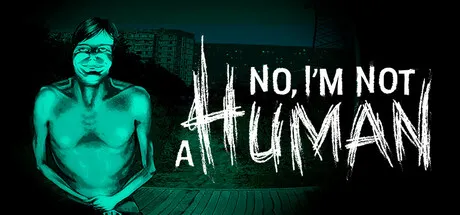
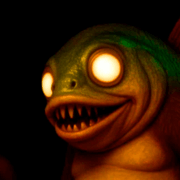
No, I'm Not a Human is a claustrophobic doorstep survival-horror thriller set during a scorching solar catastrophe where remaining indoors is the only refuge. Each night, terrified strangers knock at your lock asking for shelter—yet some of them are lethal shape-shifting Visitors wearing human faces. You must weigh radio warnings, subtle physical anomalies, and hesitant answers before turning the deadbolt. Letting an impostor cross your threshold puts everyone inside in mortal danger, while shutting out genuine survivors carries heavy consequences as dawn approaches.
Gameplay: No, I'm Not a Human
Every in-game cycle alternates between tense daytime radio briefings and high-stakes nocturnal knocks at the front door. Broadcast alerts gradually reveal telltale signs of Visitors—bloodshot eyes, unusually spotless teeth, dirt beneath fingernails, or inconsistent stories—forcing you to cross-check each guest carefully rather than guessing at random. Once someone is inside your home, limited energy lets you run targeted checks across rooms and decide whether to trust, isolate, or eliminate a suspect before the next blackout arrives.
Key features of No, I'm Not a Human
Doorstep impostor deduction
Inspect silhouettes, dialogue tone, and subtle physical cues through the peephole before unlocking the front door.
Escalating broadcast clues
Morning emergency updates reveal new Visitor signs across consecutive nights, forcing you to re-evaluate current guests.
Daily room inspection energy
Limited daytime actions make every check on a sheltering stranger a tense judgment call between mercy and survival.
How to play No, I'm Not a Human
Start by reading the morning news updates carefully so you know which Visitor traits have been confirmed for the current run. When someone knocks at dusk, examine their silhouette, dialogue tone, and physical details through the peephole before deciding whether to open the lock. Keep notes on who already lives in each room and spend your daily inspection actions on newcomers whose behavior contradicts earlier warnings. Balancing compassion with cold verification is the only reliable path to reaching the final dawn alive.
Study the morning broadcast
Read each daily warning carefully so your mental checklist reflects the latest confirmed Visitor symptoms.
Screen every knock at dusk
Compare peephole posture, voice lines, and visible traits before deciding whether to admit or refuse a stranger.
Verify newcomers indoors
Spend your limited daytime energy checking the newest housemates and cross-referencing at least two anomalies.
Controls and device notes
| Action | Input | Notes |
|---|---|---|
| Inspect peephole and choose dialogue | Left Click / Tap | Select questions, inspect room guests, and confirm whether to open the door. |
| Check daily warnings and trait menus | Number Keys / On-screen UI | Switch quickly between radio notes and inspection options. |
| Toggle fullscreen view | F or player Fullscreen button | Enlarges dark peephole portraits so subtle facial details stay legible. |
Desktop
Desktop mouse and larger monitors make small facial anomalies, eye redness, and dialogue choices easiest to inspect clearly.
Mobile & touch
Touch taps handle peephole dialogue smoothly on modern mobile browsers; rotate to landscape mode so portrait details remain readable in dim scenes.
Practical tips and mistakes to avoid
- Never rush through the daily radio briefing—new Visitor signs unlock across consecutive nights.
- Compare a guest's physical traits against multiple confirmed clues because one strange symptom alone can be a false positive.
- Maintain at least a couple of trustworthy human housemates so you are never caught completely isolated at night.
- Use your limited inspection energy on the newest arrival first before trusting them overnight.
Who might enjoy No, I'm Not a Human?
No, I'm Not a Human suits players who prefer slow-burn psychological suspense, branching dialogue choices, and tense deduction over twitch shooting.
Why use this game page?
Player-first layout
The player and its loading status stay above the guide. Site advertisement slots are separate from the game controls.
Practical context
Use the contents links to find input instructions, device limitations and available game-specific notes without losing this page.
A relevant next step
Compare category and topic links, then choose another named game from the recommendations.
For a wider choice, browse the full browser-game catalog. A provider may apply its own cookies, ads or restrictions; read our privacy notes.
Frequently asked questions about No, I'm Not a Human
Can I play No, I'm Not a Human free in my browser?
Yes. Launch the embedded HTML5 browser version right above with no downloads, installs, or account registration.
How do you tell humans apart from Visitors?
Listen closely to each day's emergency broadcasts, then inspect suspects for confirmed anomalies such as strange teeth, red eyes, unusual fingernails, or contradictory statements.
Are all Visitor signs guaranteed proof?
No—some exhausted humans display a single suspicious trait, so combining multiple checks and dialogue answers prevents tragic mistakes.
Does No, I'm Not a Human work on mobile browsers?
It runs on modern desktop and mobile browsers via tap or mouse click, though desktop screens make inspecting small facial clues easier.
Game provider
Start with No, I'm Not a Human
Question desperate strangers knocking after sundown, cross-check daily radio alerts for Visitor anomalies, and decide who earns shelter indoors. Read practical inspection habits below, or browse more survival horror games by category.
Read the No, I'm Not a Human guide and controls before you begin.
Browse by category
Explore the catalog →Guides and comparisons
All guides →Compare named games and follow the contextual links back to their play pages.
No, I'm Not a Human survival guide: spotting Visitors without turning away allies
Learn practical inspection habits for No, I'm Not a Human: track daily radio traits, combine physical checks, and balance shelter safety until dawn.
Stealth escape vs action horror: choosing your browser horror pace
Compare stealth escape horror in Granny Returns Haunted House and Basic 9 Remaked against fast combat in Ultrakill Prelude and FNAF Shooter.
Find your next session
Explore browser games on No, I'm Not a Human
Start with a game page rather than a download button. Each entry brings the available player, a guide and its browsing categories into one layout. Check the individual loading status and device notes before deciding what to play; a catalog listing is not a promise that every provider works on every device.
Continue with Ultrakill Prelude, Basic 9 Remaked or FNAF Shooter.
How to choose a game
Choose the challenge
Use category and topic pages to narrow the catalog. Read the actual objective instead of assuming two similarly labelled games share the same rules.
Check your input
Read the desktop and mobile notes on the game page. Choose a game with controls suited to your device.
Keep the next step relevant
Use related-game links and comparison articles to move from one named entry to another, without navigating an unrelated list.
Doorstep deduction and atmospheric horror play
Start with No, I'm Not a Human above to weigh radio warnings against subtle stranger clues, then shift into stealth chases and eerie night shifts including Basic 9 Remaked, Granny Returns Haunted House, and Bendy and the Ink Machine. Every game page brings its browser player, practical controls, and device notes into one dark-mode layout.
Read the No, I'm Not a Human guide →